

Datasheet
2 min read
OVERVIEW
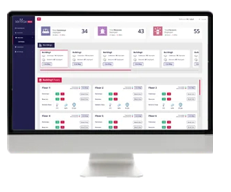
Sentrax’s Solix Suite is a cloud and on-premises device management and connectivity platform for Smart Buildings, Healthcare, and Manufacturing. It supports applications from building administration and security management to physical asset tracking.
Using BLE and high-precision BLE-AoA tags in various form factors, Sentrax provides real-time sensor and location data through facility-installed scanners and gateways. Environmental and climate conditions can also be monitored with Sentrax sensors and scanners.
The web dashboard enables live tracking of all sensors and tags, which can be attached to assets or assigned to patients, staff, customers, and workers for safety, security, and attendance applications across hospitals, factories, warehouses, and high-security environments.
| Features | Solix Lite (Device Manager) | Solix Standard (RTLS) | Solix Advanced (RTLS + IoT) |
|---|---|---|---|
| Downloadable gateway/beacon data | ✔ | ✔ | ✔ |
| Devices management and configuration | ✔ | ✔ | ✔ |
| Gateway placing on the map | ✔ | ✔ | ✔ |
| User-defined 2D floor maps / GeoJSON maps | ✔ | ✔ | ✔ |
| Customizable dashboard | ✔ | ✔ | |
| Live map | ✔ | ✔ | |
| RTLS tracking management system | ✔ | ✔ | |
| User management system | ✔ | ✔ | |
| Gateway health history data | ✔ | ✔ | |
| Tag and sensor data stream (MQTT) | ✔ | ✔ | |
| Tag positioning data stream (MQTT) | ✔ | ✔ | |
| Heat map | ✔ | ✔ | |
| Notifications & alerts | ✔ | ✔ | |
| Regions alerts for tags (SMS & Email) | ✔ | ✔ | |
| Historical data (Sensor & Positioning) | ✔ | ✔ | |
| Advanced RTLS & environmental sensors reporting | ✔ | ||
| Third-party devices management | ✔ | ||
| Remote configuration (API/MQTT) | ✔ | ||
| Access to rest API for development metadata | ✔ |
KEY COMPONENTS
- Beacons & Tags
- Scanners / Gateways
- Solix Server
- AoA Engine
KEY FEATURES
- Manage and tracking
- Real Time Location Service
- Event Reporting
- Alert Systems
- Notifications
- Reporting & Analytics
KEY BENEFITS
- Real Time Visibility
- High Level Accuracy
- Increased Security
- Increased Productivity
- Environmental Monitoring
USE CASES
- Assets Tracking
- Persons Tracking
- Healthcare
- Smart Building
- Manufacturing
- Fleet Management
LIVE TRACKING INDOOR (MAP VIEW)
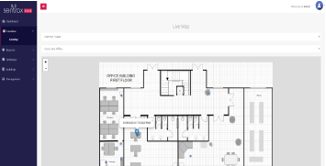
Solix uses RTLS Engine which determines the location of the tag by using a system of Gateways. These Gateways calculate the exact distance by time-of-flight method through strategically placed gateways in the facility. It can provide zone, room or meter level accuracy of its location information. The platform would display their positions on a map, or a layout of the area being monitored.
HEAT MAP INDOOR (MAP VIEW)
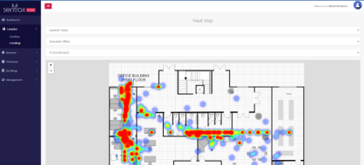
Solix uses API which determines the heatmap location of the tags. The platform would display their positions on a map, or a layout of the area being monitored by visually representing tags position history.
DEVICE PLACING ON MAP
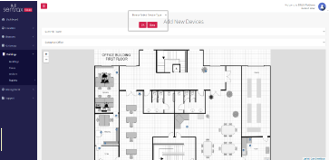
Solix Suite’s ‘Device Placement Mapping’ feature allows users to accurately place and visualize devices on a digital map. This feature enhances spatial awareness and aids in optimizing device deployment and monitoring within a given area.
HISTORICAL DATA OF DEVICES (LIST VIEW)
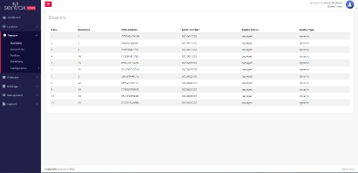
The Solix system is tailored for Management Systems applications, offering a web-based list format that presents historical data of devices. This view showcases all the information of beacons, gateways & tags including their summary, deployment type, and timestamps.
ADD NEW REGION
This feature allows users to establish a new area or segment within the software application or web portal. Its purpose can range from handling operations in a new location to organizing data and resources for distinct business units or needs.
| Notifications and Alerts | Solix Standard (RTLS) | Solix Advanced (RTLS + IoT) |
|---|---|---|
| System Level Alerts | ||
| Device Activation Alert An alert is generated when a device becomes active. | ✔️ | ✔️ |
| New User Addition Alert You’ll receive an alert when a new user is added to the system. | ✔️ | |
| Time-Based Alert This alert provides information on the duration of the notification. | ✔️ | |
| User Level Alerts | ||
| Geofence Alert This alert is triggered when a device enters or exits a predefined geofence. | ✔️ | ✔️ |
| Motion Detection Alert An alert is sent when a device detects motion. | ✔️ | ✔️ |
| Button Press Alert This alert is sent when a device’s button is pressed. | ✔️ | ✔️ |
| Device Tampering Alert You will receive this alert when a device has been tampered with or moved. | ✔️ | ✔️ |
| Temperature Change Alert You will be notified when the temperature exceeds a predefined threshold. | ✔️ | |
| Humidity Change Alert An alert is generated when humidity exceeds a predefined threshold. | ✔️ | |
| Pressure Alert This alert is sent when atmospheric pressure exceeds a predefined threshold. | ✔️ | |


Powered by BetterDocs