


Blog
BLE Proximity Tracking with Sentrax: From Market Challenges to Measurable ROI

Publishing brief (delete before publishing)
SEO title (58 characters): BLE Proximity Tracking: Market Challenges to ROI | Sentrax
Meta description (149 characters): See how Sentrax BLE proximity tracking closes indoor visibility gaps in three levels, from presence to BiLink room-level, and how to measure the ROI.
URL slug: /ble-proximity-tracking-market-challenges-to-roi/
Primary keyword: BLE proximity tracking. Secondary: BLE RSSI tracking, room-level tracking, BiLink, indoor asset tracking, RTLS ROI.
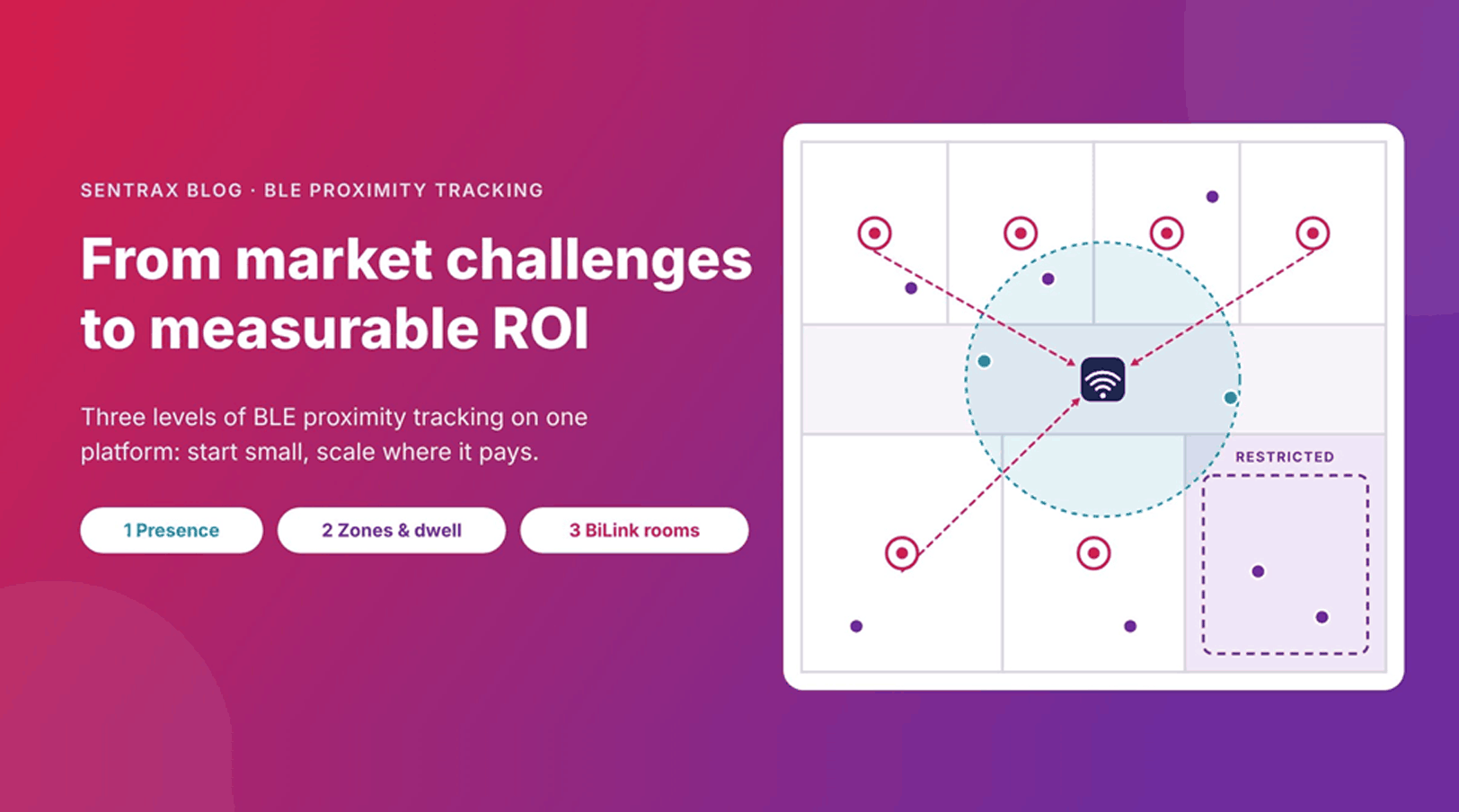
Featured image: Figure 1 (hero). Every figure below has alt text set in Word; reuse it in WordPress.
Organizations that depend on people, assets, and equipment moving around a site share one problem: they cannot see what is happening close to the work. GPS stops at the door, manual checks are slow, and many tracking systems cost more to install than the problem they solve.
Bluetooth Low Energy (BLE) has become the default radio for closing that gap. Global Bluetooth device shipments are projected to approach six billion in 2026 and pass eight billion a year by 2030, with enterprise asset tracking and healthcare monitoring among the markets where adoption is accelerating (Bluetooth SIG, 2026).
Sentrax’s BLE proximity tracking system turns that radio into answers at three levels: BLE proximity tracking, mid-level proximity tracking, and BiLink bidirectional proximity tracking. This post covers the market challenges, how Sentrax addresses them, how to put the system to work, and how to measure the return.
Key takeaways
- BLE proximity tracking gives zone- and room-level visibility indoors (typically 3–5 m) with far less infrastructure than high-precision RTLS.
- Level 1 tells you whether something is nearby, Level 2 how near and for how long, and Level 3 BiLink which room it is in, even where gateways can’t reach.
- Start with a Level 1 pilot, record a baseline, and add levels only where the data would change a decision.
Return comes from labor time, asset utilization, process efficiency, safety and compliance, and right-sized infrastructure, and each can be measured.
The market challenge
Most proximity and location systems force a choice between too little detail and too much cost. Six problems come up again and again:
- No visibility indoors. GPS does not work reliably inside buildings, so warehouses, hospitals, factories, and campuses lose track of assets and people exactly where operations happen.
- Time lost to searching and manual checks. Staff walk the floor, scan barcodes, or check clipboards to confirm where something is or who was nearby.
- Safety risk from close encounters. Workers, vehicles, and machines share space, and many incidents come down to someone not knowing something was close in time. In the US, pedestrian incidents involving motorized vehicles killed 369 workers in 2024, up 19% from 2023 (BLS, 2026).
- Heavy, costly infrastructure. High-precision real-time location systems typically need dense hardware, cabling, and careful installation, which puts them out of reach for many sites. Even simpler systems often need a cabled reader in every room to avoid blind spots.
- Data without context. Knowing a device was “seen” does not say how close it was, how long it stayed, or which room it was actually in.
- One-size-fits-all accuracy. Systems end up either too coarse for the decision or more precise, and more expensive, than the decision requires.
BLE sits in the gap between these extremes, but only if the system can scale its precision to the question being asked. That is the idea behind Sentrax’s three levels.
Our solution: how Sentrax BLE proximity tracking works
Sentrax turns the BLE signals that tags already broadcast into location context, in four steps:
- PINIX tags, badges, and beacons send small BLE advertising packets at a set interval. Many also carry sensor data such as temperature or motion.
- ZENIX gateways (and, at Level 3, NODIX BiLink anchors) pick up those packets and record the signal strength (RSSI) and a timestamp.
- The SOLIX platform filters the signal, works out which device is near which reader, and applies the rules you set, such as geofences, dwell limits, and alerts.
- Dashboards, alerts, and REST or WebSocket APIs push the result into the systems you already run, such as ERP, MES, WMS, or BMS.
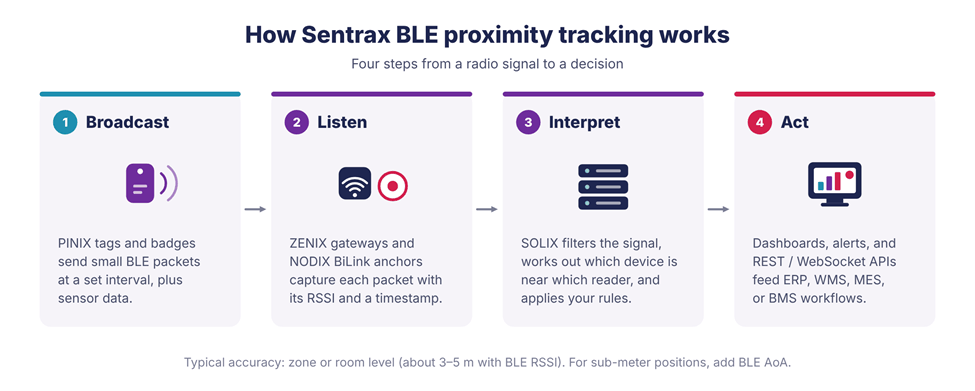
Figure 2. From a radio signal to a decision in four steps.
The three levels below differ mainly in how much work happens at steps 2 and 3, and each one answers a different part of the challenges above.
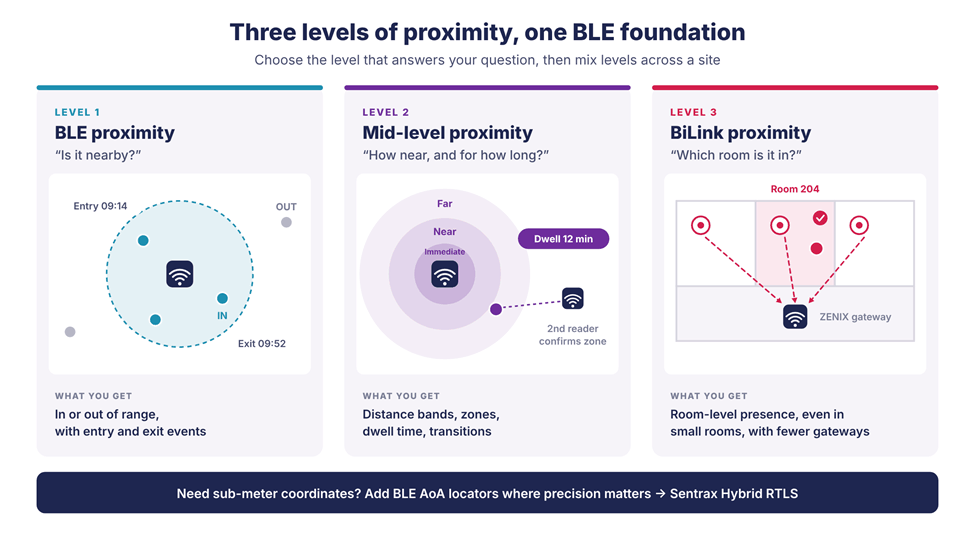
Figure 3. Each level answers a different question on the same BLE foundation.
Level 1: BLE proximity tracking (is it nearby?)
Level 1 answers the simplest question: is a tagged person or asset within range of a reader? Sentrax compares signal strength against a threshold and reports a device as present or absent, logging entry and exit events as it moves in and out of range.
It is the lowest-cost way to get started. Tags and badges can run for long periods on small batteries, and a single ZENIX gateway can hear tags up to around 100 m away in open space (less through walls and metal, depending on the environment and antenna), so a small number of gateways can cover a large floor.
Best for:
- Presence and attendance checks
- Entry and exit logging for rooms, docks, or departments
- Confirming that equipment is in the area where it belongs
The trade-off is precision. Walls, metal, and human bodies all change signal strength, so Level 1 tells you a device is in range, not where in the range it is.
Level 2: Mid-level proximity tracking (how near, and for how long?)
Mid-level tracking moves from “in range” to “in which zone, and for how long.” Instead of a single threshold, the SOLIX platform groups signal strength into distance bands such as immediate, near, and far, and tracks how long a device stays in each.
Three capabilities make this reliable:
- Signal smoothing. Sentrax averages and filters repeated readings so one noisy spike does not trigger a false movement.
- Multi-reader confirmation. When several gateways hear the same tag, Sentrax compares their signal strengths to place it in a zone with more confidence than any single reader could.
- Dwell time and transitions. The platform records when a device enters a zone, when it leaves, and how long it stayed.
Best for:
- Zone-based alerts, such as a tagged item entering a restricted area
- Workflow timing, such as time spent at a station, in a queue, or in a bay
- Safety rules that depend on how close a person is to a hazard, such as a pedestrian entering a forklift-only aisle
Level 2 gives you zone-level accuracy (typically 3–5 m with BLE RSSI) rather than exact coordinates, which is often all an operational decision needs.
Level 3: BiLink bidirectional proximity tracking (which room is it in?)
Gateways work well in corridors and open areas. In buildings with many small or enclosed rooms, though, they leave blind spots, and signals that pass through walls can place a tag in the wrong room. A cabled gateway in every room fixes that, at a high price in hardware, cabling, and maintenance.
BiLink is Sentrax’s bidirectional BLE architecture for exactly this case. A compact, battery-powered NODIX CEN-1 BiLink anchor goes into each room or doorway. Unlike a passive beacon, each anchor both scans and broadcasts:
- Local detection. The anchor scans for nearby tags and captures their signal strength and identity, creating room-level presence at the edge.
- Validation at the anchor. Anchors filter the signal and recognize valid packets, so only verified tag events are passed on. This cuts the overlap and wrong-room readings common in gateway-only setups.
- Relay to the gateway. Verified events are relayed wirelessly to nearby ZENIX gateways, extending coverage into small rooms, blind spots, and transitional spaces without new cabling.
- Processing in SOLIX. The SOLIX platform turns those events into room-level presence and smooth zone transitions.
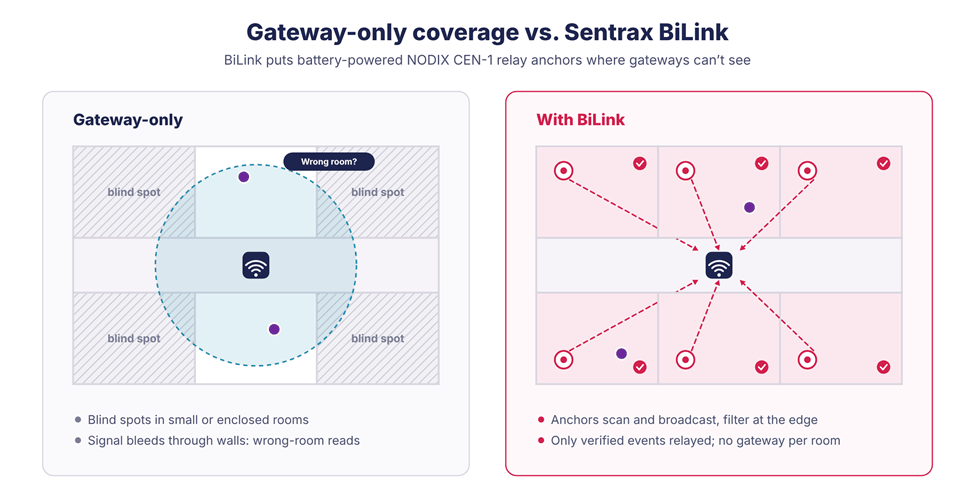
Figure 4. BiLink anchors cover the rooms a corridor gateway can’t, without a gateway per room.
The result is reliable room-level visibility (roughly 2–4 m, depending on layout and environment) with fewer gateways and no wiring in each room. The NODIX CEN-1 runs on replaceable batteries rated for about two years at a one-second advertising interval, and longer at slower intervals.
Best for:
- Hospitals, clinics, and labs with many patient, treatment, or storage rooms
- Multi-room offices, schools, and secure facilities where you need to know which room, not just which floor
- Entry and exit points, corridors, and transition areas where tags move between zones
- Retrofits where running new cable to every room is impractical
The trade-off: BiLink gives room-level presence, not exact coordinates, and the anchors’ batteries need periodic replacement.
How to leverage Sentrax: choose a level, then scale
Start with the question you need answered, and the level follows from it.
Level | Question it answers | What you get | Best for | Trade-off |
1. BLE proximity | Is it nearby? | In or out of range, entry and exit events | Presence, attendance, entry/exit logging | Coarse; no distance bands |
2. Mid-level proximity | How near, and for how long? | Distance bands, zones, dwell time | Zone alerts, workflow timing, restricted areas | Works best with more than one gateway in the area |
3. BiLink proximity | Which room is it in? | Verified room-level presence and room-to-room transitions, with fewer gateways | Multi-room buildings, blind spots, retrofits | Room-level, not exact coordinates; anchor batteries to maintain |
Most deployments mix levels. A hospital might use Level 1 for general equipment presence on each floor, Level 2 for restricted areas such as pharmacy stores, and Level 3 BiLink in patient rooms where room-level accuracy matters.
Where each level fits, by industry
| Industry | Typical problem | Where to start | Example rule |
| Healthcare | Staff time lost searching for pumps, wheelchairs, and monitors; no room-level view | Level 1 for equipment on each floor; Level 3 BiLink in patient rooms | Alert when an infusion pump has not been seen on its home ward for 2 hours |
| Warehouses and logistics | Lost carts and pallets; forklifts and people sharing aisles | Level 1 for assets; Level 2 for docks and pedestrian zones | Alert when a tagged worker enters a forklift-only zone |
| Manufacturing | Missing work-in-progress and tools; hidden bottlenecks | Level 2 for stations and bays; AoA where tools need exact positions | Flag a station when dwell time exceeds the target cycle time |
| Airports | Baggage carts, trolleys, and mobile equipment spread over a large site | Level 1 across areas; Level 2 for restricted zones | Notify security when a contractor badge enters a restricted zone |
| Smart buildings | Unknown room occupancy; visitor and contractor movement | Level 3 BiLink for room occupancy; Level 1 at entrances | Send hourly room occupancy to the building management system |
Roll out in phases
A phased rollout keeps cost and risk low:
- Pilot at Level 1 in one area to establish a baseline: how often items go missing, how long searches take, how many incidents occur. Sentrax’s BLE RSSI Evaluation Kit (scanners, beacons, environmental sensors, and SOLIX access with a live dashboard) is built for this step.
- Add Level 2 where zone and dwell-time data would change a decision, such as bottlenecks or restricted areas.
- Add Level 3 BiLink in multi-room areas and blind spots where you need reliable room-level presence.
- Review the data against the baseline, then extend to more zones or sites.
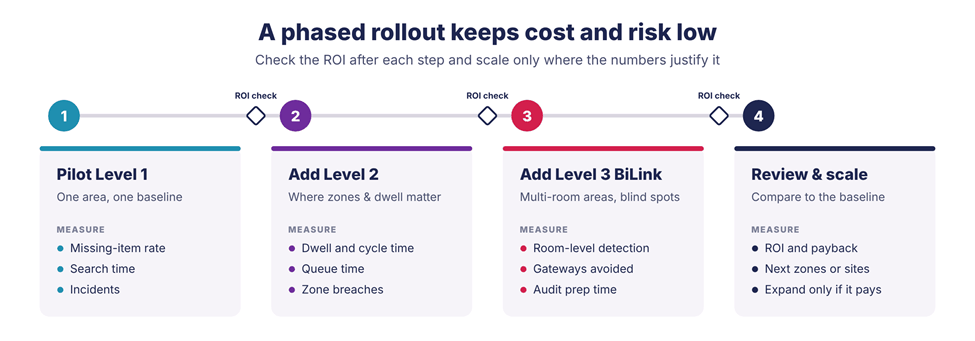
Figure 5. Check the ROI after each step and expand only where it pays.
When you need more than proximity
Some decisions do need exact positions, such as tracking tools on a production line or vehicles in a busy aisle. For those, Sentrax adds BLE Angle of Arrival (AoA) locators, which calculate a tag’s position from the angle its signal arrives at and reach sub-meter accuracy. Sentrax Hybrid RTLS combines AoA in critical hotspots with RSSI proximity tracking everywhere else, in one system and on one platform.
The ROI of proximity tracking
Return comes from five places, and each can be measured against the baseline you set in the pilot.
| Source of return | What changes | Metric to track | Levels that drive it |
| Labor time | Less time spent searching for assets and verifying locations | Minutes per search; hours of manual checks per week | 1, 2, 3 |
| Asset utilization and loss | Fewer lost, misplaced, or idle assets | Lost-asset count; utilization rate; replacement spend | 1, 2, 3 |
| Process efficiency | Shorter waits and fewer bottlenecks, found through zone and dwell data | Dwell time per station; cycle time; queue time | 2 |
| Safety and compliance | Fewer close calls through zone alerts; verified presence records for audits | Incident and near-miss count; audit preparation time | 2, 3 |
| Infrastructure cost | Precision matched to the question, and BiLink anchors instead of a gateway per room | Cost per area covered; installation time; gateways avoided | 1, 2, 3 |
To turn those metrics into a number, compare the annual benefit with the annual cost of hardware, software, installation, and support:
ROI (%) = (Annual benefit − Annual cost) ÷ Annual cost × 100
Payback (months) = Upfront cost ÷ Monthly net benefit
A worked example
To show how the numbers fit together, take a hypothetical mid-sized site. These figures are assumptions for illustration, not a customer result; replace them with your own pilot data.
| Item | Assumption | Estimated Annual value |
| Labor time saved | 40 staff each save 10 minutes per shift, 250 shifts a year, at $30/hour | $50,000 |
| Fewer lost assets | Losses fall from 15 to 6 a year, at $2,000 per asset | $18,000 |
| Faster audit preparation | 80 fewer hours a year at $45/hour | $3,600 |
| Total annual benefit | $71,600 | |
| Hardware and installation | $45,000 upfront, spread over 3 years | $15,000 |
| Software and support | Per year | $15,000 |
| Total annual cost | $30,000 |
ROI = ($71,600 − $30,000) ÷ $30,000 × 100 ≈ 139%. Payback = $45,000 ÷ (($71,600 − $15,000) ÷ 12) ≈ 9.5 months.
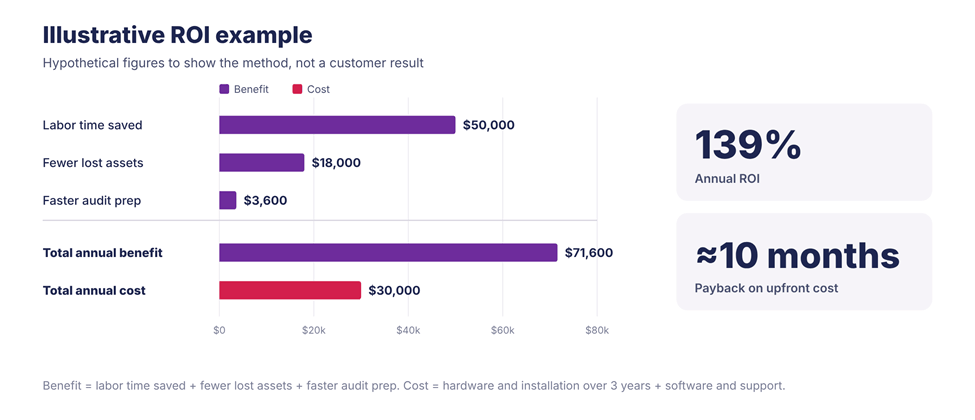
Figure 6. Illustrative figures only; process-efficiency gains are left out to keep the example conservative.
Because the rollout is phased, you can check this result after the Level 1 pilot and again after each new level, and expand only where the numbers justify it.
[Editor: add a real customer or pilot result here, for example “Hospital X cut equipment search time by Y% in Z months”, to back the example with real data.]
Frequently asked questions
What is BLE proximity tracking?
It uses the signal strength (RSSI) of Bluetooth Low Energy tags, measured by fixed gateways or anchors, to tell whether a person or asset is near a reader, in which zone or room, and for how long. It costs less than high-precision RTLS and suits presence, zone, and room-level questions.
How accurate is it?
With BLE RSSI, Sentrax typically delivers zone- or room-level accuracy of about 3–5 m. BiLink makes room-level detection more reliable in multi-room buildings, and BLE AoA adds sub-meter accuracy where it is needed.
Do I need a gateway in every room?
No. With BiLink, battery-powered NODIX CEN-1 anchors cover individual rooms and relay verified events to shared ZENIX gateways.
How long do the batteries last?
It depends on the device and how often it broadcasts. For example, the NODIX CEN-1 anchor is rated for about two years at a one-second advertising interval, and longer at slower intervals.
Will it work with our existing systems?
Yes. SOLIX exposes REST and WebSocket APIs, and ZENIX gateways can publish to your own MQTT broker, so location events can feed ERP, MES, WMS, BMS, or healthcare platforms.
How do we start?
With a small pilot. Sentrax’s BLE RSSI Evaluation Kit includes scanners, beacons, environmental sensors, and access to the SOLIX platform with a live dashboard.
Start where you are, scale where you need to
Proximity tracking is a ladder, not a single feature. With Sentrax you can begin at Level 1 to know what is nearby, move to Level 2 to understand zones and time, and add Level 3 BiLink where you need reliable room-level visibility without a gateway in every room. It all runs on the same BLE foundation, with a return you can measure at each step.
Ready to see which level fits your site? Book a Sentrax demo or request a BLE RSSI Evaluation Kit to run your own pilot.
Related reading
- How BiLink Simplifies Room-Level RTLS for Healthcare
- How Hybrid BLE RTLS (AoA + RSSI) Is Redefining Location Intelligence
- How to Choose the Right RTLS Platform: Moving Beyond Basic Asset Tracking
Sources
- Bluetooth SIG, Bluetooth Market Dashboard 2026 (data from ABI Research).
- S. Bureau of Labor Statistics, Census of Fatal Occupational Injuries Summary, 2024, released February 19, 2026.
- Sentrax, RTLS Technology, BiLink Proximity Tracking, NODIX CEN-1 and ZENIX LEN-1 product pages.
Editor’s notes: what changed and what to confirm (delete before publishing)
Corrections made
- Level 3 rewritten. The draft described BiLink as tag-to-tag tracking with on-device alerts and matching records on both devices. Sentrax’s own technology, BiLink and NODIX CEN-1 pages describe anchor-level bidirectional relay: anchors in each room scan and broadcast, validate tag events, and relay them to ZENIX gateways for SOLIX. The Level 3 section, the comparison table, the ROI table and the conclusion now match that.
- ROI formula fixed. It was raw LaTeX code (“\text{ROI} = \frac{…}”) that would print as code in Word and WordPress. Replaced with a plain-text formula, a payback formula and a worked example.
- Broken CTA fixed. “Book a Sentrax demo” was Markdown syntax with an “add link” placeholder instead of a real link. It now links to the Sentrax booking page, plus a second CTA to the Evaluation Kit page.
- Product names added (PINIX, ZENIX, NODIX, SOLIX) to match sentrax.com; “phones” removed from step 1 since the system is built around Sentrax tags.
Please confirm
- BiLink accuracy is inconsistent on the website: the Technology page says 3–5 m, the BiLink solution FAQ says 2–4 m and the NODIX CEN-1 datasheet says 2–3 m scanning accuracy. This post uses “room-level (roughly 2–4 m)”. Worth aligning the site too.
- “Mid-level proximity tracking” is not a term used on sentrax.com. Confirm it is the approved name for Level 2.
- ZENIX range “up to 100 m” comes from the LEN-1 datasheet, which notes it depends heavily on the environment.
- Customer proof: add a real pilot or customer figure at the yellow note in the ROI section.
